DownloadThis Version
620KB
|
Sandboxie 3.40Sandboxie - 620KB (Freeware) |
# Translations:
* Macedonian translation contributed.
# New Features:
* Full support for Windows 7.
* Improved support for User Account Control (UAC) elevation: Elevation requests are handled by the Sandboxie Start.exe program. (Windows Vista/7. Elevation from a standard user account is not supported at this time.)
* Improved support for WinSxS assemblies eliminates error 14001 for sandboxed programs, and makes it possible to install a wider range of software.
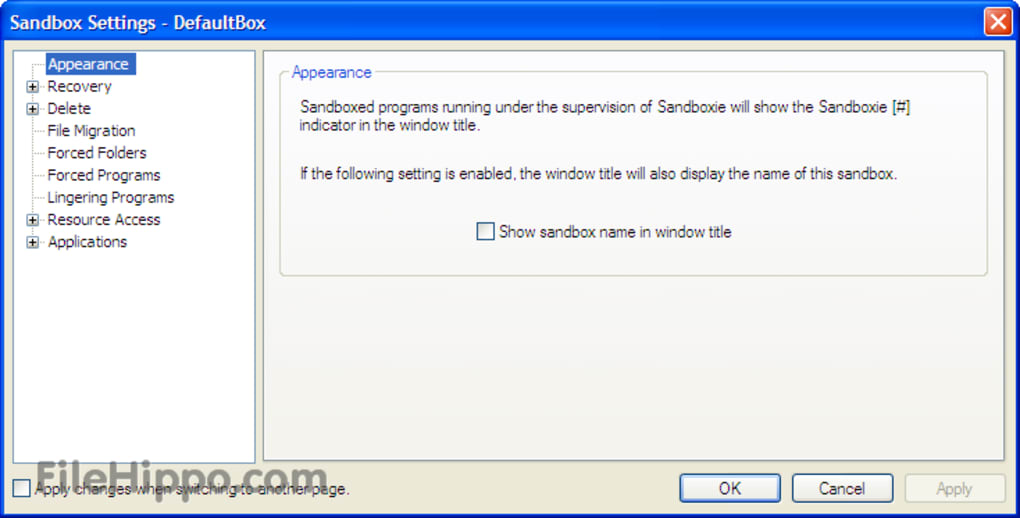
* Configuration Protection: Sandboxie configuration can be locked for Administrator-only access or with a password.
* A new "Run As UAC Administrator" option appears in the Run Any Program window and the right-click Run Sandboxed sandbox selection window. (Windows Vista/7.)
* Sandbox folders are created with a Sandboxie icon.
# Fixes:
* Tightened protection to prevent actions by malicious programs such as closing windows outside the sandbox, changing the password for the logged-on user account, changing system parameters or colors, or initiating logoff sequence.
* SandboxieCrypto service takes only a few seconds to start, rather than a few minutes. (Windows Vista/7.)
* Alleviate need for all programs in the sandbox to run as Administrator when installing new software, thus permitting software to be installed directly from the browser, for example. (Typically applies to Windows Vista/7.)
* Color border appears even when the taskbar is hidden.
* Sandboxed progams have improved handling for arrival/removal of new drive letters.
* Improved support for sandboxed programs writing files into directory junctions and volume mount points.
* Improved access to hardware devices by sandboxed programs.
* Sandboxie AutoPlay cancellation when CD/DVD drives are forced honors the Disable Forced Programs mode.
* Fixed a problem when Sandboxie is installed to a folder with non-English characters in its name.
* Changed default delete sandbox command for Eraserl secure delete:
Use -method DoD_E -resultsonerror rather than -method Gutmann -results.
* For a full list of changes, see topics and discussion in the Sandboxie Beta Version 3.39 forum.
# Third-party software:
* Improved compatibility with Kaspersky Internet Security 2010, Norton Internet Security 2010 and ZoneAlarm Security Suite 9.
* Improved interoperability of Microsoft Outlook under Sandboxie and Windows Desktop Search outside Sandboxie.
* Improved support with some download manager software.
* Macedonian translation contributed.
# New Features:
* Full support for Windows 7.
* Improved support for User Account Control (UAC) elevation: Elevation requests are handled by the Sandboxie Start.exe program. (Windows Vista/7. Elevation from a standard user account is not supported at this time.)
* Improved support for WinSxS assemblies eliminates error 14001 for sandboxed programs, and makes it possible to install a wider range of software.
* Configuration Protection: Sandboxie configuration can be locked for Administrator-only access or with a password.
* A new "Run As UAC Administrator" option appears in the Run Any Program window and the right-click Run Sandboxed sandbox selection window. (Windows Vista/7.)
* Sandbox folders are created with a Sandboxie icon.
# Fixes:
* Tightened protection to prevent actions by malicious programs such as closing windows outside the sandbox, changing the password for the logged-on user account, changing system parameters or colors, or initiating logoff sequence.
* SandboxieCrypto service takes only a few seconds to start, rather than a few minutes. (Windows Vista/7.)
* Alleviate need for all programs in the sandbox to run as Administrator when installing new software, thus permitting software to be installed directly from the browser, for example. (Typically applies to Windows Vista/7.)
* Color border appears even when the taskbar is hidden.
* Sandboxed progams have improved handling for arrival/removal of new drive letters.
* Improved support for sandboxed programs writing files into directory junctions and volume mount points.
* Improved access to hardware devices by sandboxed programs.
* Sandboxie AutoPlay cancellation when CD/DVD drives are forced honors the Disable Forced Programs mode.
* Fixed a problem when Sandboxie is installed to a folder with non-English characters in its name.
* Changed default delete sandbox command for Eraserl secure delete:
Use -method DoD_E -resultsonerror rather than -method Gutmann -results.
* For a full list of changes, see topics and discussion in the Sandboxie Beta Version 3.39 forum.
# Third-party software:
* Improved compatibility with Kaspersky Internet Security 2010, Norton Internet Security 2010 and ZoneAlarm Security Suite 9.
* Improved interoperability of Microsoft Outlook under Sandboxie and Windows Desktop Search outside Sandboxie.
* Improved support with some download manager software.
EN


NetBeans IDE 7.3.1
Virtual PC 2007 SP1
SQL Server 2012 Express
MySQL 5.6.12
VMware Server 2.0.2
Inno Setup 5.5.3

![Scientists are getting very close to creating an actual invisibility cloak, as separate research teams over the past week have revealed significant advancements in the area. From an invisibility cloak scaled up to be able to hide a person to a quantum invisibility cloak that can hide objects in time, there is no better moment for fans of H.G. Wells and the Harry Potter franchise than this one. The invisibility cloak that uses time was designed by Purdue University scientists. Unlike the spatial cloak we all saw in Harry Potter, this device uses time cloaking, a relatively new concept based on the idea that in some places in time, the things that happen are not picked up. Since nobody can tell that these things occurred, it’s like they never happened. The concept still has a long way to go before it turns into reality, although scientists have been able to cloak small electrical signals so far. The technology may be difficult to grasp, yet researchers think that if successful , it will be a major breakthrough in making quantum information computing and storage very successful. Another research team, meanwhile, detailed how to make an invisibility cloak to hide large objects, including a person. The New York University of Rochester scientists used a conventional arrangement of lenses and mirrors to drive the light around the area they want to hide from view. The human-scale cloak also manages the impressive feat of hiding items across the entire optical range. But it still faces one major problem: that is only works in one direction, which means the hidden object becomes visible if the viewpoint changes. Nonetheless, this large-scale cloak could be successfully used to hide satellites in orbit and other huge objects. And a Shanghai-based team of researchers unveiled another invisibility cloak which they claim can be adjusted to make items invisible from any line of sight. The scientists demonstrated the cloak by making a pet goldfish and a cat disappear. According to the Chinese team, the device may have important applications in security, surveillance and entertainment. http://www.youtube.com/watch?v=YNO9-DYCi2U With all the new ideas and research, it seems we will see an actual invisibility cloak in use very soon. What do you think of this technology? What would you do if you had your very own invisibility cloak? [Image via Mental floss]](http://cdn.techbeat.com/wp-content/uploads/2013/06/invisibility-harry-120x80.jpg)